Education
Unitree R1 vs G1 vs H2: Choosing A Humanoid Robot For Your University
Compare Unitree R1, G1, and H2 for university teaching and research: size, degrees of freedom, sensing, compute, and…
How hospitality operators evaluate, deploy, and scale commercial robots.
Tell us your industry and we'll recommend 3-4 robots to shortlist.
We evaluate, certify, and service every robot we sell.
From marketing, sales, demonstrations, and proof-of-concepts through deployment, training, support — and even repair. Local teams, local inventory, same-day service.
By Elad Inbar, RobotLAB founder & CEO — a practical guide to adopting robotics that actually delivers ROI.
About the book →A K-12 AI Lab is more than robots. See the four categories of RobotLAB AI Labs, what students build in each, and what comes in the box, from curriculum to teacher training.
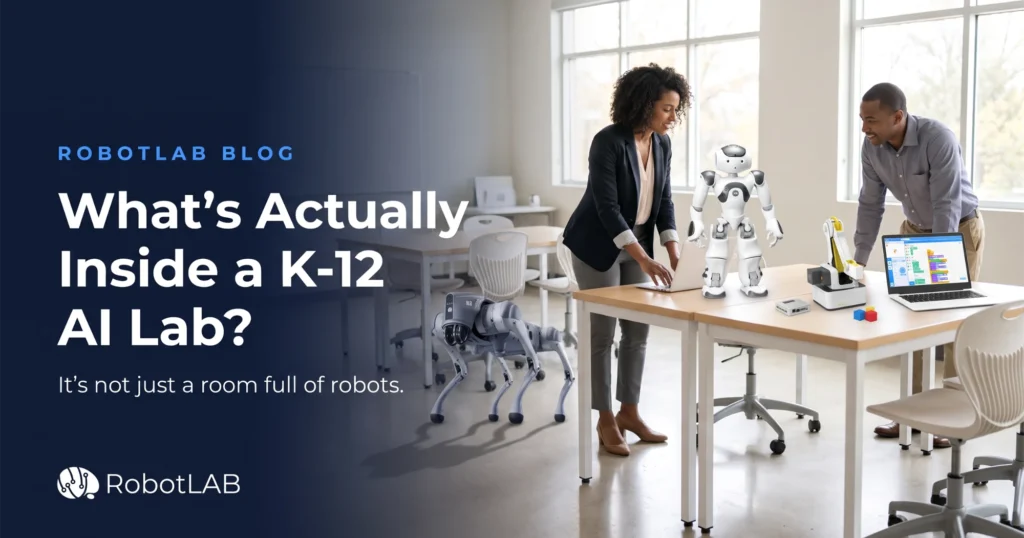
Ask ten administrators what an “AI Lab” is and you’ll get ten answers. One pictures a room of laptops running chatbots. Another pictures a humanoid robot greeting visitors in the front office. A third pictures an expensive cart of equipment sitting in a closet because nobody was trained to use it.
None of those is the real thing.
An AI Lab is a complete learning system: the hardware, software, curriculum, furniture, and teacher training a class needs to start building real AI on day one. The robots get the attention, but they’re one part of a working lab.
Here’s what goes into one, and how to work out which parts fit your program.
At RobotLAB, an AI Lab is a turnkey, customizable learning space built from AI Stations. Each station is centered on one real-world application of artificial intelligence, and students rotate through them. A typical lab includes:
That last item matters most. Equipment without a plan to run it is how labs end up in closets.
Most AI Labs are built from one or more of four categories. Treat them as building blocks, not a fixed package. You don’t need all four.
What students learn: coding, perception, machine learning, and how people interact with robots.
This category is the one that gets students to make machines understand people. They program NAO to recognize objects and read emotions. Pepper holds real conversations on a school-safe setup. The Unitree G1 extends the same ideas to a full-size humanoid.
Students can work in block-based environments or move up to Python, Java, and C++, so a single platform can serve a beginning class and an advanced one.
Best fit for: computer science pathways, AI electives, and programs that want a high-visibility centerpiece that brings students (and school board members) into the room.
What students learn: navigation, locomotion, sensor integration, and autonomy.
The Unitree Go2 quadruped takes students into the problems professional roboticists work on: How does a legged robot keep its balance? How does it map a room and plan a path? How do multiple sensors combine into one picture of the world?
Best fit for: engineering pathways, robotics teams, and advanced students who have outgrown wheeled classroom robots.
What students learn: robotic arm programming, vision systems, conveyors, and the logic behind a modern factory floor.
Students start by programming a Dobot Magician Lite robotic arm to pick, place, sort, and draw. Then they scale up to the Dobot Mini Car Assembly Line, a student-sized Industry 4.0 production line where several stations work together to build a product.
Watch the Mini Car Assembly Line in action
Best fit for: CTE programs, advanced manufacturing pathways, and schools working with local industry partners who need automation-ready graduates.
What students learn: a full AI and coding pathway across multiple disciplines.
For schools that want the whole room designed at once, RobotLAB AI and STEM Labs come ready to run on the first day. They’re organized into three program tiers:
| Tier | Level | Example stations |
|---|---|---|
| Intro to AI | Elementary & middle school | Intro to Robotics, Intro to Coding, Intro to VR/AR, Intro to Engineering, Space Exploration |
| Practicing AI | High school | Humanoid Robotics, Industry 4.0, Smart Cities & Green Energy, Smart Transportation, Space Exploration |
| Mastering AI | University & research | Intelligent Autonomous Agents, Smart Warehouse, Tele-Operation, Human-Robot Interaction, Smart Farming |
A school can start at the tier that matches its students and move up as the program matures. Any tier can be extended with a VR Lab, a Fab Lab, or a full-size AI-enabled humanoid.
Best fit for: new buildings, renovations, and districts launching a flagship STEM, STEAM, or STREAM space.
A lab is only as good as what students do in it. Here are three projects that show the range:
Each project comes with curriculum, hardware, software, and equipment sized to your class, so teachers aren’t building lessons from scratch.
No, and you shouldn’t have to hire for one. Every RobotLAB AI Lab package includes onsite installation and teacher training, and each configuration comes with more than 1,000 hours of ready-to-teach, hands-on activities. RobotLAB’s team stays available after the lab opens.
RobotLAB has been bringing robotics into schools since 2007, has more than 32,000 customers worldwide, and has deployed more than 16,000 robots. Consulting, site evaluation, customization, deployment, training, and support come with the lab. You get a working program, not just a shipment.
You don’t need to decide everything at once. Most programs pick one category, get it running, and add the next one when funding allows. The useful first question isn’t “Which robots should we buy?” It’s “What should our students be able to do?”
Explore the stations, the three program tiers, and how RobotLAB designs a lab around your space, your students, and your budget.
Explore AI Labs →Turnkey labs with curriculum, installation, and teacher training included.
Compare Unitree R1, G1, and H2 for university teaching and research: size, degrees of freedom, sensing, compute, and…
Unitree sells most robots in standard and EDU editions. Here is what the difference means for university teaching…
You don't need a full AI Lab budget to start. Here's a phased plan for planning, funding, and…
Lidia is an AI assistant. This conversation is stored and shared with the RobotLAB sales and support teams. Privacy policy
Chatting as · Not you?
You choose which categories of cookies are stored on your device. Strictly-necessary cookies are required for the site to function and cannot be disabled. Read more in our Privacy Policy.
Session, security, and the consent record itself. Required for the site to operate.
First-party tracking (Mautic, on t.robotlab.com) so we understand which pages and products visitors engage with and improve the site over time.
Advertising pixels (Google Ads, Meta Pixel) used to measure ad performance and show relevant ads on partner sites. Turning this off opts you out of CCPA "sale" of personal information.